Case study
Comet Design System
Colours and fonts.
Everything else, from zero.
- Role
- Sole designer on the system
- Team
- Founder · Product managers · Partnerships · In-house designers · Engineering agency
- Scope
- Audit to V1: colour, type, tokens, components, handoff
01
The problem
Comet had brand foundations: six colours and two typefaces. That was the whole system. No scale, no tokens, no components, no states, no responsive rules and nothing written down, so every page was designed from scratch and the in-house team had nothing to design from.
An audit of the shipped code showed what that had cost.
The brief: build the system around what the brand had already decided, without redesigning the pages. Every pass had to leave them looking near-identical.
02
The system in use
A system is only as good as the components it produces. Here is one, live: the product card, with every part traced back to a decision in the system.
Hover, press or tab to it
- 1Tag
Micro10px caps at .16em. One tag at most, and never yellow: yellow is kept for the one main button on the screen. - 2Plate and photo
card/plate#F4F4F4. On hover the photo slowly grows 5% inside the plate, over 1.1 seconds. The plate, frame and text don't move. No shadow, no lift. - 3Name and priceSpace Grotesk in the
Buttonvoice, not body copy. Price rows behave like navigation, so they take the control voice. - 4Silhouette
Body Sin Montserrat at #6F6F6F. Copy, so it takes the copy face. - 5EdgeA 1px hairline at 12% ink. Neighbouring cards share it, so two cards never make a double line.
- 6Ratio lockThe plate is locked at 164:200, so every resized instance on every page stays true.
Product card, traced
Built in code from the Figma component's specs. Same sizes, colours and states as the library.
03
Foundations
The brand's six colours were locked; everything around them was mine to define, and every colour got a job, not just a name. Type went from 55 sizes to an 8-step scale of even numbers and 12 roles named by what they do, never by their size.
I built it code-first with Claude, then mirrored it into Figma by measuring the live build, because the in-house designers work in Figma and engineering hands off from it. 185 CSS rules now read from one token file, with zero raw type values left.
Locked by the brand
- BlueBrand accent, doubles as info.
- BerryError, and only error. The stock red was deleted.
- YellowOnce per view, never on small text: 1.25:1 on white.
six locked brand colours, role stops built around them, and a job for each accent.
55 sizes → 8 even steps
- Display40→72
- Body L16
- H132→56
- Body M14
- H224→32
- Body S12
- H320→24
- Label12
- H416
- Button12
- Micro10
- Caption10
12 roles named by job. Headings scale fluidly between phone and desktop; Micro and Caption share a size and differ by tracking.
04
Responsive
The team had been designing to two fixed breakpoints. I made the case for headings that scale continuously with the screen instead, and they adopted it. The code showed why it would hold: 24 of the site's 26 fluid type rules never grew past their phone size. The desktop half had never been written. Writing it once, into the tokens, made every desktop layout an adoption pass instead of a redesign.
Fluid type, live
Each heading scales from its phone size to its desktop ceiling, then stops (Display at 1200px, H1 at 1273px). The hatched edges are the page margin: 16 on phones, 20 on desktop.
05
Calls I made
- D.01Body at 14, not 16. My own grid jumped from 12 to 16, but the site read best at 14. Judgement over rounding; no page moved.
- D.02Bold kept, for display only. I'd have gone lighter. The brand's uppercase voice ran across 41 rules, so it stayed where it carries meaning.
- D.03A 96px hero wasn't worth a size. Display tops out at 72; one page doesn't get its own step.
- D.04No dark layer in V1. Nothing needed it yet, so it was logged as a future decision instead of invented early.
06
Stress tests
A second typeface, midway. Comet's site used two typefaces. I moved everything onto Space Grotesk alone because it read more premium, and the team agreed. Midway, they decided to bring Montserrat back. Every role already had its own tokens, so it landed as a token change, not a redesign: 448 Figma text layers updated on their own, and no size, weight or spacing moved. Labels and price rows stayed in Space Grotesk. They are structure, not copy.
Built for every day
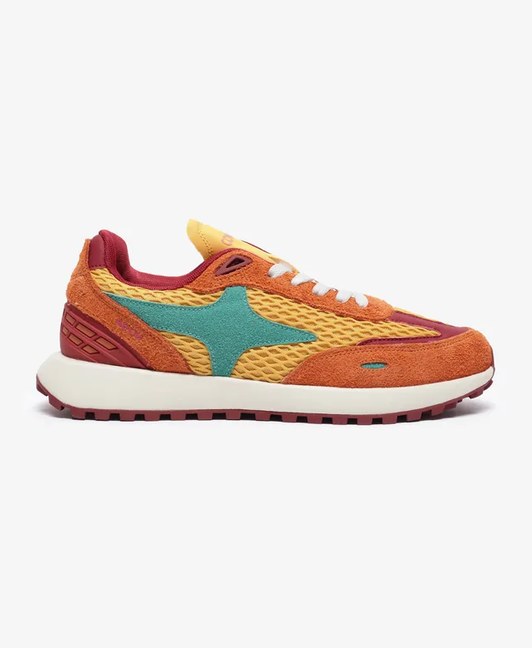
Every pair is tested for a full day on its feet before it ships, across city streets, long commutes and everything between.
Flip the setup
The change lives in one token. Everything else in the card stays exactly where it was.
A request the rules couldn't grant. The client wanted Blog and Video tags “in different colours”. There was no free colour left: berry means error, and yellow is unreadable that small. So the tags differ by form instead. Two clearly distinct tags, and the meaning survives greyscale and colour blindness.
07
Components
Every state in the library is tagged LIVE (in the build) or PROPOSED (designed, awaiting approval), so the library can lead the code without misrepresenting it. Each family ships with a plain-language doc frame for the product team and the engineering agency.
Swipe for every state →
Button: every state
The first column is live: hover it, press it, tab to it. Focus is a 2px ring set 2px out; loading keeps the button's width so nothing around it jumps.
Desktop
Swipe for every state →
Phone
Product card: every state
Phones have no hover or focus, so those states don't exist there. Sold out dims the photo and the name; loading holds the card's shape.
Buttons & controlsVariants
- Button48
- Text link10
- Round arrow8
- Pill · switcher3
- Pill · year3
- Pager2
Product card & trayVariants
- Product card16
- Tray arrow12
- Tray header5
- Product tray4
- Card tag3
11 families · 114 variants · 3 doc frames
The whole library
Two families are shown in full above because every page uses them. The rest sit in the same file, and every one is written up in a doc frame: where it goes, what each state means, and why it looks the way it does.
08
Governance
and handoff
A system without an owner drifts. So the decisions live where people can find them, and changes go through a gate.
- G.01A decision log in the repo. Every colour and type call carries its reason and a status: ratified, provisional or open. Changes amend an entry; they never erase it.
- G.02One approval gate. Nothing enters the system without sign-off, and a request that would break a rule is flagged before anything moves.
- G.03Finals only in Figma. Retired work is deleted, not parked. A handoff file is a contract, not an archive.
Comet Design System: Decision Log
The spine of the system: every ratified value or rule lives here with its reason, date, and status. Nothing enters the system without an entry; nothing leaves without its entry being marked superseded.
| # | Decision | Reason | Status |
|---|---|---|---|
| G3 | Lean over exhaustive: a value earns its place by having a written job | Akshay: “no infinite colours no one can use”; restated at type: “not having any styles defined if they haven’t been used” | Ratified |
| C7 | Error family = Berry (50 #FFF0F4 · 200 #FFADC5 · 500 #EF426F · 700 #B01844); stock rose ramp deleted | Two near-identical red families would collide; brand-coherent feedback | Ratified |
| T9 | Two small voices, separated by tracking, not size. Label/Micro is the wide caps voice (.16em: chips, tags, kickers); Caption is the tight one (.04em: meta rows, credits, spec tags). Both sit at 10px | The audit’s 10px caps rules split cleanly into two tracking families; size alone could not tell them apart, and merging them would have flattened a real distinction | Ratified |
| L6 | A responsiveness pass may not change the shipped mobile rendering, and that is proven by geometry diff, not by eye. Every element measured at 360 before and after | The pass touched eleven sections; “it looks the same” does not survive that. The diff caught two real regressions that no screenshot review would have caught | Ratified |
| C15 | Raised-on-dark #141414 has no V1 home; dark-surface semantic layer deliberately not added yet | Declined the extra layer for now. Decide when dark sections are brought onto the system | Open |
| Recorded as a deliberate divergence, not drift | Provisional |
From the decision log
Six entries from the log in the repo, quoted with light trims. Open calls stay visible as open, and a reversed call is struck through, not deleted.
Comet · Design system · Buttons
One button,
three looks
Every button on the site is this one component. You choose how loud it is (Type), how big it is (Size) and what it is doing right now (State). Square corners, CAPS text, nothing else to decide.
Which one do I use?
Primary · yellow
The main thing we want people to do on this screen: Shop now, Add to cart, Checkout, Log in. Only one Primary per view. If two things feel equally important, one of them is not.
Secondary · ink
A main action in a place where yellow would fight the content, for example on top of colourful product photos or inside the filter panel.
Ghost · outline
The second choice next to a Primary or Secondary: Clear all, Cancel, View details. It never stands alone as the only button.
Ghost on dark
The same Ghost button, for black or photo backgrounds. White outline, white text.
From the handoff file
An excerpt from the Buttons doc frame in Comet's Figma file, set as text. Every component family has one, written so the product team and the engineering agency can use it without a designer in the room.
09
The outcome
The in-house team gets a system to design from, instead of re-deciding every page. Building the library also surfaced what the eye had missed: four button styles, a chip at 1.2:1 contrast, and no focus or disabled states anywhere. All now designed.
Still open, on purpose. Spacing, shape and motion are codified as tokens but haven't had their own audit yet, and the code drift the library found is logged for the engineering rebuild rather than patched by hand.
Coming next. The page designs built on this system are with the engineering agency. They land here when Comet's new site goes live.